Time Blocking a Week on Graph Paper: One Square Per Half Hour
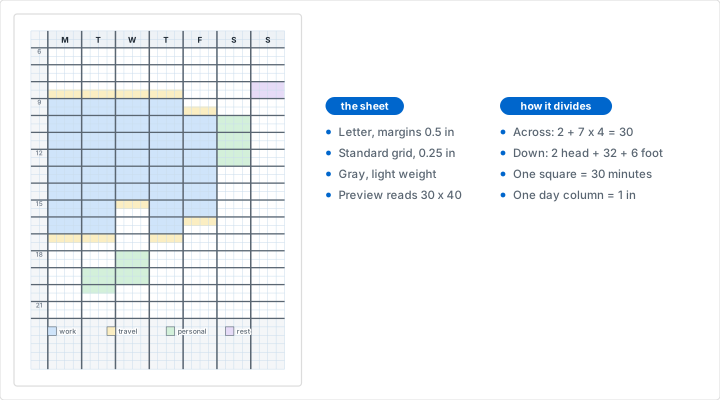
To time block a week on graph paper, print quarter inch squares on Letter and use one square per half hour down the page. That sheet is 30 squares across by 40 down, which divides exactly into a two square label column plus seven day columns of four squares each, so the week fits with nothing left over. Rule the eight column lines in ink and a heavier line every two squares for the hours, fill the fixed commitments first, then count the squares that are left before you promise any of them to anything.
What Does a Grid Settle That a Planner Insert Cannot?
Three things decide whether a time blocked week survives past Wednesday: the size of the unit, the width of a day, and whether there is anywhere to record what changed. A printed planner answers all three for you, and usually answers them wrong.
The unit comes first. A planner row is an hour because an hour is the height that fits the printed type, not because an hour is how work arrives. Half the real blocks in a week are 30 or 90 minutes, and both of those are awkward in an hour row: one leaves the row half empty, the other needs a line drawn across the middle of the next one. With one square per half hour, every duration becomes a count. A 30 minute block is one square, an hour is two, 90 minutes is three, and nothing has to be squeezed or split.
The width comes next. Seven columns an inch wide hold a short label, three or four words in small handwriting, which is the right amount of room: a block is a name and a time, not a description. The tasks themselves belong on a list somewhere else, which is the division of labor the weekly spread in our bullet journaling tutorial sets up, where the collection holds the work and the spread holds the hours.
The last one is revision, and it is the one a grid is quietly best at. A week always changes. On a printed grid a moved block is an arrow from one square to another, drawn in two seconds and still legible in Friday's review, because nothing was deleted to make room for it. This is also the whole appeal of running the week on paper rather than on a screen: the sheet is one of the screen-free uses of a grid that gains nothing from being an app, since the only thing it has to do is lie there and be looked at.
The Sheet: Thirty Squares Across, Forty Down
Open the generator, leave it on Letter and imperial, keep the standard grid at 0.25 inches, and leave all four margins at the 0.5 inches a preset gives you. The line under the preview then reads 30 squares across x 40 squares down. Set the line color to gray and the line weight to light, because every mark you make this week has to read more strongly than the grid under it.
Those two numbers are the reason this works. Letter inside half inch margins is 7.5 by 10 inches, which at a quarter inch is 30 by 40 whole squares, and both of those divide exactly into the parts a week needs.
The Columns: Two Squares for Time, Four for Each Day
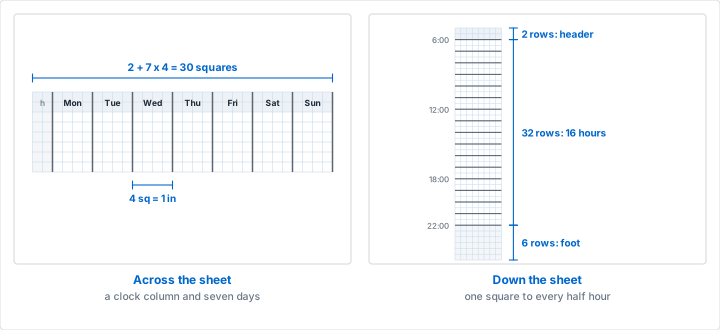
Give the first two squares, half an inch, to the clock. That is room for an hour written as a number, or as 06 and 30 stacked if you prefer the 24 hour form. The remaining 28 squares divide into seven columns of four, one inch each:
- 2 squares, 0.5 in: the time column
- 7 columns of 4 squares, 1 in each: Monday through Sunday
- 2 plus 28 is 30, the full width of the printed grid
Start the week on Monday or on Sunday as you like; the arithmetic does not care, and the only thing that depends on it is the header. Counting columns into a fixed width like this is the same move as the desk rows in our seating chart tutorial: decide the unit first, then the layout is forced rather than designed.
The Rows: One Square Per Half Hour
Down the page, 40 rows split three ways:
- 2 rows, 0.5 in: the header. One row for the day name, one for the date.
- 32 rows, 8 in: the day itself, one square per half hour, which is 16 hours.
- 6 rows, 1.5 in: the foot strip, for the key and for what slipped.
A quarter inch row is 6.35 mm, which is exactly the ruling of narrow ruled paper, so a few words of ordinary handwriting fit in one without being cramped. If your writing is larger than that, the answer is a larger square rather than a tighter hand: the same trade our post on handwriting practice works through, where the square is chosen from the height of the letters and not the other way round.
Ruling the Column Lines and the Hour Lines
The generator prints every line at one weight, which is correct for a sheet whose layout you have not decided yet and not quite enough for one you have. Two sets of lines are worth adding by hand, and they take about a minute.
The column rules come first. Draw down the grid line after the second square, then after every fourth: squares 2, 6, 10, 14, 18, 22 and 26. That is seven lines, and the printed edge of the grid at square 30 closes the last column. Each one sits on a line that is already there, so there is nothing to measure.
The hour lines come second. Every second row starts a new hour, so darken those 16 lines across the day band and leave the half hour lines pale. The effect is worth the effort: the eye reads hours at a glance and half hours only when it needs them, which is how you want to read a week.
There is one way to get a printed hour line out of the generator instead, and it is worth knowing even if you do not use it. Engineering paper prints a heavier line every fifth square, so if you accept 12 minutes as the unit, five squares make an hour and every hour line arrives printed. Twelve minutes is a strange thing to plan in, and a 90 minute block becomes seven and a half squares, so most people would rather rule 16 lines. The honest alternative to both is to rule one master sheet, in ink, and photocopy it for the rest of the quarter.
Which Hours Should the Sheet Cover?
Thirty two rows is 16 hours, and where you start them is the only real decision on the sheet. Start at 06:00 and the day runs to 22:00, which suits most weeks: the eight hours the sheet leaves out are the ones nobody blocks anyway.
Shift work moves the window rather than changing its size. Start the same 32 rows at 14:00 and the sheet covers to 06:00 the following morning, which is one continuous night rather than two half pages. If the week genuinely needs more than 16 hours, the sheet has to change rather than the handwriting:
- 0.2 inch squares on Letter: 37 across by 50 down, which is 2 plus seven columns of 5, and 40 rows for a 20 hour day.
- Quarter inch squares on Legal: 30 across by 52 down, the same columns with 44 rows, which is 22 hours.
- 5 mm squares on A4: 38 across by 55 down, which holds all 48 half hours of a full day.
Resist covering hours you never block. Empty rows are an invitation, and a sheet that offers you 05:00 every morning will eventually get a block written in it that nothing in your week supports. Write the hour numbers into the time column in ink before you copy the sheet, so every week starts already labeled and you never spend Sunday evening writing numbers.
How Many Squares Is a 90 Minute Block?
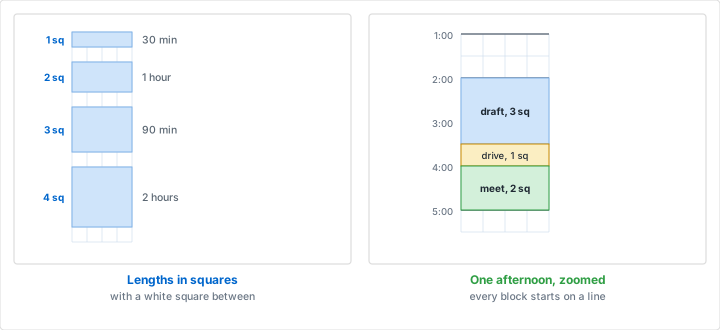
Once the unit is half an hour, every length in a normal week is a small whole number, and the useful ones are worth knowing by heart:
- 1 square: 30 minutes. Also the right home for a 25 minute focus timer and its 5 minute break.
- 2 squares: one hour, the default meeting.
- 3 squares: 90 minutes, which is as long as most people do one hard thing well.
- 4 squares: two hours, a deep work block or a long errand.
- 8 squares: half a working day.
- 16 squares: eight hours, which is exactly half the height of a day column.
The awkward length is 45 minutes, which is a square and a half. Take two and finish early. Rounding up to the square is the rule throughout, and the slack it creates is the only buffer the sheet has: a 20 minute task between two blocks has nowhere to go, so it waits in the foot strip until a square opens up. That refusal is a feature, not a limitation. A unit that can hold anything lets you promise anything.
Give a square to travel, too. Two blocks in different places are three blocks, and the one in the middle is the drive. A week that forgets this is a week that runs 20 minutes late from Tuesday morning onward.
Fill the Fixed Blocks First, Then Count What Is Left
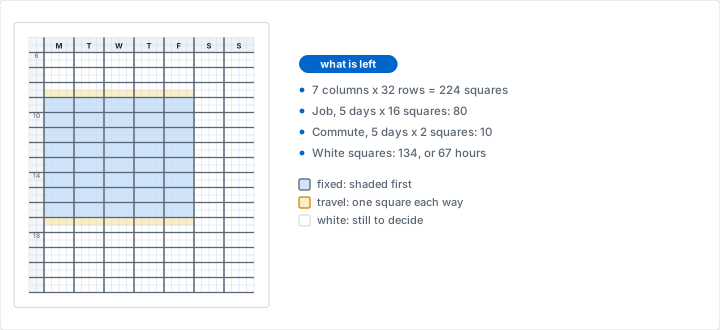
Fill the sheet in three passes, in this order. First the blocks you do not control: work hours, classes, standing meetings, the commute, a pickup at 15:30. Shade these rather than writing in them, and label each one once in the middle of the shape. Second the blocks you have decided to protect, which get written in pen. Third, and only third, everything you would like to do, in pencil, in the squares that are still white.
The reason for that order is the count that falls out of it. The sheet holds 7 columns of 32 squares, which is 224 squares, or 112 hours. Take a week with a job from 09:00 to 17:00, five days, at 16 squares a day: that is 80 squares. Add half an hour of commute each way, 2 squares a day, and that is 10 more. So 90 of 224 squares are gone before the week starts, and 134 squares, 67 hours, are left for everything else.
That number is the entire argument for drawing the week rather than listing it. Sixty seven hours sounds like plenty until you lay six projects into it and watch the white squares run out in the first three days. The sheet does not negotiate and it does not forget to carry, and the answer to "there is no time for that" stops being a feeling and becomes a count of squares.
Which Color Key Stays Readable All Week?
Three to five categories is the whole budget. Four is typical: work, personal, admin and rest. Beyond five the key stops being something you recognize and becomes something you look up, and a key you have to look up may as well not be there.
Shade pale and write on top. Muted highlighters are made for exactly this; an ordinary marker will bleed through a quarter inch square and take the next row with it. Keep ordinary work uncolored so the colored squares still mean something, which is the same discipline that keeps the year in pixels sheet readable: if every square is colored, nothing is marked. One square, one color is the same rule that pixel art on graph paper runs on, and it fails the same way when the palette grows.
If you photocopy the ruled master rather than printing each week, remember that color copies as gray. Hatch instead of shading in that case, with one hatch per category: diagonal one way, diagonal the other, cross hatch, dots. Hatching also survives a scan, which matters if the week gets photographed and sent to anybody.
A quieter alternative to all of it is to print the week on dot grid paper at the same 0.25 inch spacing. The dots give you the same counting with much less ink on the page, so your own blocks are the only drawn lines on the sheet. The trade is that you have to count dots to find 15:30 rather than follow a line across, which is fine on a sheet you look at twenty times a day and poor on one you hand to somebody else.
The Foot Strip: What Slipped and What Moves
The 6 rows at the foot, 30 squares wide and an inch and a half deep, are the part of the sheet that most templates leave out and most weeks need. Three jobs fit there comfortably:
- The key, in the leftmost columns: four shaded squares with four words beside them.
- What slipped, in the middle: any block that did not happen, written once, with nothing else said about it.
- What moves, at the right: the two or three things that are going straight into next week's sheet.
Mark the week as it happens rather than at the end of it. A block that ran gets a tick in its top right square. A block that moved gets an arrow from its old square to its new one. A block that was abandoned gets a single line through it, left readable on purpose. The sheet is then a record of the week as lived, not a plan that quietly stopped being true on Tuesday, and the three marks take about a second each.
How Do You Review the Week Before Printing the Next?
Give the review ten minutes and three counts. How many blocks ran as drawn, how many moved, and how many were never touched. The ratio matters much more than the total: a week where two blocks in three ran is a week whose plan was roughly honest, and a week where one in three ran is a week that was a wish list with times attached.
Then look for position rather than quantity. The same block moving three weeks running is not a discipline problem, it is in the wrong row, and the fix is to redraw it where the week actually has room. Blocks that collapse after 16:00 every day are telling you the afternoon window is shorter than the sheet says. This is the same reading that a month of filled cells gives you in our hexagon habit tracker, at a scale of one habit instead of a whole week.
Keep the sheets. Fifty two of them is a record of a year that no calendar export will reconstruct, because it holds what was planned as well as what happened. For a term rather than a quarter, the same sheet works as a class timetable and a study week, which our back-to-school guide sets out alongside the grids each subject needs.
Which Generator Settings Should You Use?
| What you want | Paper and grid | Squares | Columns | Rows |
|---|---|---|---|---|
| The standard week | Letter, 0.25 in | 30 x 40 | 2 plus 7 x 4 | 2 head, 32 half hours, 6 foot |
| A longer day, same paper | Letter, 0.2 in | 37 x 50 | 2 plus 7 x 5 | 2 head, 40 half hours, 8 foot |
| Hour blocks and big writing | Letter, 0.5 in | 15 x 20 | 1 plus 7 x 2 | 1 head, 18 hours, 1 foot |
| The metric sheet | A4, 5 mm | 38 x 55 | 3 plus 7 x 5 | 3 head, 48 half hours, 4 foot |
| A 22 hour day for shift work | Legal, 0.25 in | 30 x 52 | 2 plus 7 x 4 | 2 head, 44 half hours, 6 foot |
| One day per sheet, on a clipboard | Half letter, 0.25 in | 18 x 30 | 2 plus 1 x 16 | 2 head, 24 half hours, 4 foot |
| A wall sheet for a household | Ledger, 0.25 in | 64 x 40 | 8 plus 7 x 8 | 2 head, 32 half hours, 6 foot |
Every row uses the standard grid in gray at the light weight, with the margins the paper preset gives you: 0.5 inches on the imperial sheets and 10 mm on A4. Check the square count under the preview against the table before you print. If it disagrees, a margin has been changed, or the grid unit was switched after the size was typed.
Two rows are worth a word each. The A4 sheet is taller relative to its width, so the same shape leaves room for the whole 24 hours; if you only want 16, start the day band lower and give the extra rows to the foot. The Ledger sheet is the household version: two inch day columns instead of one, wide enough for two people's names in the same square, and large enough to read from across a kitchen. It is the same large sheet our room layout tutorial reaches for when a plan outgrows Letter.
If the sheet has to carry typed headings, a form title or a name and date line, build it in a document instead of writing on it, sized by the method in our post on putting graph paper in a document: print a sheet the exact size of the space the grid has to fill and type the two numbers back. And if the week is going to live on a tablet, the same sheet imports as a page template, which our post on digital graph paper for tablet apps covers.
Which Mistakes Make a Blocked Week Useless?
Mistake: Blocking Every Square
Problem: All 224 squares carry something, so the first 20 minute overrun pushes every block after it. By Tuesday the sheet describes a week that is not happening, and a sheet nobody believes is a sheet nobody reads.
Solution: Leave one square in four white, and end each half day with an unblocked hour. The empty squares are what absorb the overruns, and a week that still fits on Thursday is worth more than one that was complete on Sunday.
Mistake: Writing Tasks Instead of Blocks
Problem: The columns fill with items rather than times: call the bank, email the landlord, order the part. The sheet becomes a to-do list that happens to have hour lines on it, and nothing on it can be counted.
Solution: One square or more per block, with a label that names the work and not the item. Admin at 16:00 for two squares is a block; seven errands stacked in one square is a list, and the list belongs on another page.
Mistake: Forgetting the Commute and the Transitions
Problem: Blocks are drawn edge to edge, so the sheet assumes you are in two places at once at 13:00. The plan was 10 squares of work short before the week began.
Solution: Draw travel as its own shaded block, one square for anything under 30 minutes. Count those squares when you count the week: they are often the difference between 67 free hours and 60.
Mistake: Printing Fifty Two Copies in January
Problem: A year of sheets comes out of the printer, and after two weeks the hour window is wrong, the day columns want to be wider, or the key needs a fifth color. The stack is now too useful to throw away and too wrong to use.
Solution: Print four. The layout changes twice before it settles, and re-printing a week costs one sheet of paper. Only rule and copy a master once a month has gone by without you wanting to change anything.
Mistake: Fit to Page in the Print Dialog
Problem: The sheet printed at 96 percent, so the squares are 0.24 inches and the grid is 28 and a half squares across rather than 30. The columns no longer divide, and the error only shows up once a ruler comes out.
Solution: Set the print scale to 100 explicitly, then measure ten squares on the first sheet: at a quarter inch they span exactly 2.5 inches. Our printing tips guide works through the dialog settings that cause this.
The Bottom Line
Time blocking fails on the layout far more often than on the discipline. An hour row cannot hold a 30 minute block, a column two words wide cannot hold a label, and a plan with nowhere to record a change stops being true the first time something moves. All three are layout problems, and a printed grid answers all three by counting.
So print the sheet: Letter, quarter inch squares, gray at the light weight, 30 across by 40 down. Give two squares to the clock and four to each day, two rows to the header and six to the foot, and one square to every half hour in between. Shade the blocks you do not control, count the white squares that are left, and mark the week as it happens. Ten minutes on Sunday evening will tell you more about where your week actually goes than a month of calendar notifications.
Print Your Time Blocking Week
Quarter inch squares on Letter in light gray: 30 across and 40 down, which is a two square time column plus seven day columns of four. Free, with no account and nothing to install.
Create Your Weekly SheetRelated Resources
- Bullet Journaling on Graph Paper: the collections and weekly spread this sheet sits next to
- The Hexagon Habit Tracker: one habit for one month, when a whole week of hours is more than you need
- Year in Pixels for 2027: the same counting at a year's scale, one square a day
- Dot Grid Paper: the quieter ruling for a sheet you write on twenty times a day
- Engineering Graph Paper: a heavier line every fifth square, and where it lands on a time sheet
- Graph Paper in a Document or Spreadsheet: how to put this grid behind a typed title block
- Back-to-School Graph Paper: the same sheet as a term timetable and a study week
- Professional Printing Tips: the settings that keep a quarter inch square a quarter inch