Year in Pixels for 2027: A 365-Square Mood and Habit Tracker on Graph Paper
A year in pixels is the simplest tracker there is: one small square for every day of the year, colored each evening for how that day went. Twelve columns for the months, 31 rows for the dates, and by December the sheet is a picture of the whole year that no list or app summary comes close to. It is also a tracker that is often abandoned by February, usually because the template was too small to color neatly, the key had too many colors to remember, or the grid was ruled by hand and had drifted out of square by March. A printed sheet fixes the ruling, and the rest is a handful of decisions made once, before January 1. This article covers the settings that fit all 365 days on one Letter or A4 sheet with room for a key, how to lay out the month and date labels, the seven squares to cross out before you start, how to build a color key that reads at a glance, what to track besides mood, and how to read the year back once it is full.
Why a Whole Year on One Sheet
Most trackers live a month at a time. A new spread goes in every few weeks and the old ones turn over out of sight, which is fine for starting a habit, and it is exactly what the hexagon habit tracker does with one numbered month. What a monthly page hides is the slow pattern. A bad February is visible on a February page. A February that was worse than every other month, or a run of gray weeks that comes back every November, is only visible when the months sit side by side.
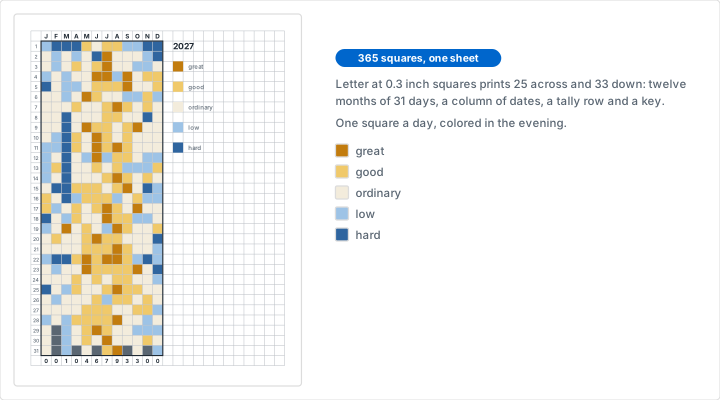
A year in pixels puts them side by side. Each column is a month and each row is a date, so reading down a column reads a month, and reading across a row compares the same date in all twelve. The name comes from pixel art on graph paper: each square is one pixel, filled with one flat color, and the year is the picture. Twelve narrow columns of color are surprisingly readable from across a room. A good stretch shows up as a block of one color, a hard week as a band of another, and a season as a change in the overall tone of a column.
It is also the smallest daily commitment a tracker can ask for. One square, one color, about ten seconds. There are no words to write, no ratings to add up and no decisions to make after January except which color today was. That is the best argument for it, and it is why it suits anyone who has tried a full bullet journal on graph paper and found the daily pages too much.
Print the Sheet
In the generator, set the grid style to the standard grid, the measurement system to imperial, the paper size to Letter and the grid size to 0.3 inches. The line under the preview should read 25 squares across x 33 squares down. That count is the whole design. The generator fills the sheet inside half inch margins with as many whole squares as fit, so 0.3 inch squares cover 7.5 inches of width and 9.9 inches of height: 13 columns for the calendar with 12 more beside it for a key, and 33 rows for a header, 31 dates and one row to spare.
On A4, set the measurement system to metric, the paper size to A4, the grid unit to millimeters and the grid size to 8, in that order, because changing the grid unit resets the size. The preview then reads 23 squares across x 34 squares down inside 10 mm margins. That is the same 13 calendar columns with 10 left for the key, and two spare rows under the dates instead of one.
Line Color and Weight
Set the line color to gray and the line weight to light. The default blue is a good drawing color, but it competes with the colors you are about to add, and a day filled in blue pencil on a blue grid is harder to read than it should be. Gray lines at the light weight stay dark enough to color up to and drop back behind the fill, so the finished sheet reads as color rather than as grid.
Use the standard grid rather than dot grid paper or engineering graph paper. A pixel needs four edges to color up to, and dots give you only the corners. Engineering paper looks useful for its heavy line every fifth square, but the header row pushes every heavy line one row off the dates: the first falls between the 4th and the 5th rather than under the 5th, which is worse than no heavy line at all.
Print at 100 percent with page scaling turned off. Fit to page shrinks every square, and at 0.3 inches there is no size to spare.
Lay Out the Grid
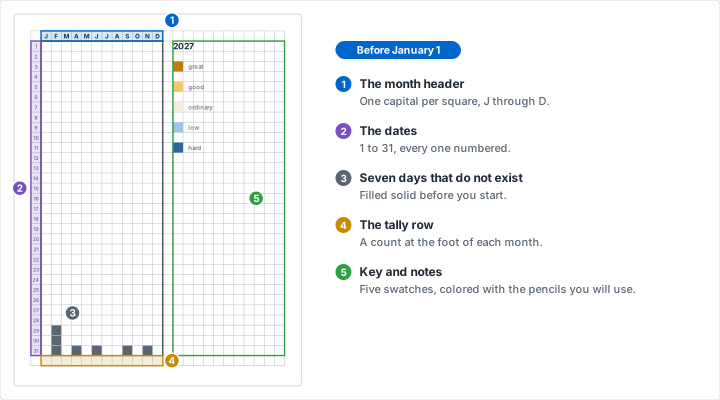
Do the layout once, in pencil first and then in fine pen, before the year starts. Everything below fits the 25 by 33 Letter sheet. The A4 sheet is the same with one more spare row and two fewer key columns.
- The top row is the month header. Skip the first square and letter the months across the next twelve: J, F, M, A, M, J, J, A, S, O, N, D. One capital per square is all a 0.3 inch square holds legibly, and the order makes the repeated letters unambiguous.
- The first column is the date. Skip the top square and write 1 to 31 down the next 31. Number every date rather than every fifth one. At this size, counting down eighteen squares at night is exactly where wrong-row mistakes come from.
- The row under the 31st is the monthly tally. It has one square at the foot of each month, which is where a count for that month belongs. Leave it empty until the month ends.
- The twelve columns on the right are the key and the notes. Five swatches with a word beside each take a corner of that block. The rest holds the year, the rule for what you are tracking, and notes on anything you want to remember about a stretch of days.
Finish by inking a slightly heavier line around the 12 by 31 block of day squares. It separates the calendar from its labels, and it gives the eye a frame to read the columns against. If you want a lettered title above it, there is room in the top margin, and the spacing advice in our hand lettering on graph paper post applies to a header this small as much as to a large one.
The Seven Days That Do Not Exist
Twelve columns of 31 squares is 372 squares, and 2027 has 365 days. The seven extra squares are February 29, 30 and 31, and the 31st of April, June, September and November. Cross them out or fill them solid with a dark pencil on the same evening you write the labels. An open February 29 invites a mistake at the end of the month: the eye looks for the next empty square in the column, finds the 29th, and March 1 gets colored into February.
2027 is not a leap year, so February has 28 days. 2028 is one, so next year's sheet crosses out only February 30 and 31 and has 366 days to fill.
Sundays, If You Want Them
A year in pixels has no weekdays, which is part of its simplicity and also the reason a weekly pattern can hide in it. If your weeks have a shape, a hard Monday or a good Saturday, put a small pencil dot in the corner of every Sunday square during setup. In 2027 the first Sunday of each month falls on January 3, February 7, March 7, April 4, May 2, June 6, July 4, August 1, September 5, October 3, November 7 and December 5. From each one, count down seven squares at a time. The 52 dots take about five minutes, and by spring they let a weekly rhythm show up as a pattern repeating every seven rows.
Choose a Color Key
The key is the one decision that is hard to change in March, so it deserves more thought than anything else on the sheet.
Five Colors, in Order
Five levels is the practical number for a mood scale: great, good, ordinary, low and hard, or whichever five words fit you. Fewer than four flattens the year into good days and bad days. More than six and you will hesitate every evening over which of two neighboring shades today was, and that hesitation is what ends trackers.
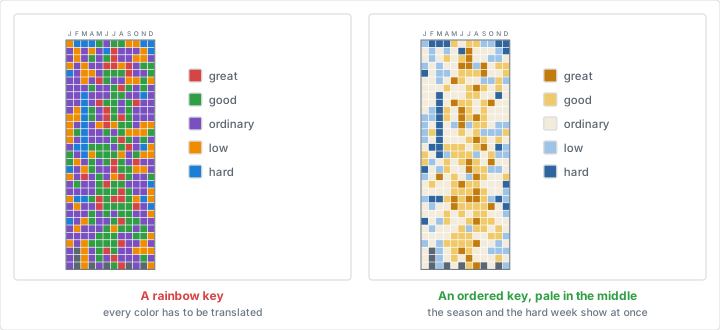
Order the colors the way the days are ordered. The scale that reads best runs from one strong color through a pale middle to another: deep gold for a great day, light gold for a good one, a pale cream for ordinary, light blue for low and deep blue for hard. The best and worst days are then the two strong ends, a good month reads as a warm column and a hard month as a cool one, and none of it needs a glance at the key. A rainbow key, with red for one mood and green for the next, makes a cheerful sheet that cannot be read at a glance, because every color has to be translated before the year means anything. A gold to blue scale also stays readable for anyone with a red and green color vision deficiency, where a red to green scale does not.
The pale middle matters more than it looks. Most days are ordinary, and if ordinary is a strong color the sheet becomes a wall of it, with the days that stood out lost inside. A pale ordinary lets the good and hard days stand out against it, which is the whole point of the sheet.
Before January 1, color the five key swatches on the sheet itself with the pencils you will actually use. A colored pencil looks different on paper than on its barrel, and a swatch on the sheet is the only honest reference. Write each word beside its swatch, then keep those five pencils together and apart from the rest of the box, so the color on December 30 is the same color it was on January 3.
Things to Track Besides Mood
The grid does not care what the colors mean. These work well because each has one honest answer per day:
- Sleep. Hours in bands: under 6, 6 to 7, 7 to 8, and over 8.
- One habit. Filled for done, left white for not. A full year of a single habit makes a strong picture, and it is the long companion to a one-month numbered hex tracker.
- Weather. The day's high temperature in 10 degree bands, read from the same source at the same time each day, which is the first rule of any lab data record as well. It is the same idea as a temperature blanket knitted or crocheted one row a day, and charting those colors on paper first is how knitting and cross stitch patterns are usually planned.
- Movement. None, some, the target, or past the target.
- Reading. No pages, a few, a chapter, or a long sitting.
Measured things like sleep and weather have one advantage over mood: several people can keep the same sheet. A weather year on one sheet makes a good kitchen or classroom wall project, with the coloring passed around. To track two things on one sheet, color the square for one and add a small dot in its corner for the other. Past two, print a second sheet.
One Square a Day
Pick a fixed moment for coloring and attach it to something that already happens every day, such as brushing your teeth at night or the first coffee the next morning. Keep the sheet where that moment happens, with the five pencils on top of it. The tracker costs ten seconds only if the pencils are in reach. A sheet in a drawer is a sheet that gets filled in a week at a time from memory.
Color the whole day, not its last hour. A day that was mostly good and ended badly is still mostly good. If you truly cannot choose between two colors, take the one closer to ordinary.
When you miss a day, color it the next morning if you remember it clearly. Past a day or two, leave it white or put a small pencil dash in it. A white square in a colored column is honest about a gap, while a color guessed from a week away records what you now think the day was like, which is a different thing. Across a year, a few white squares do no harm to the picture.
Pencils, Markers and Paper
Colored pencil is the most forgiving fill. It never bleeds, it lays down evenly in a small square if you shade in one direction, and a soft core covers in a few strokes. Highlighters and markers are faster and brighter, but on 20 lb copy paper they soak through to the back, spread past the square along the paper fibers, and are hard to match once a pen starts to dry out in August. If you use them, print on 60 lb stock, and test all five colors in the spare row before you commit.
A year of handling is harder on a sheet than a month. Keep it flat in a folder or on a board rather than folded, and if it goes on a wall, tape it by the corners rather than pinning through the calendar.
Reading the Year
The point of the sheet is the looking, and it rewards a few minutes at the end of each month as well as a longer look at the end of the year.
The Monthly Tally
On the last day of each month, count that column's squares in your best color and write the number in the tally square at its foot. One number per month is enough. If you also want the hard days, the A4 sheet's second spare row is the place for them, and on Letter they fit in the key block. By December the tally row is twelve numbers in a line, which is the most compact summary of the year you will get, and it is far easier to compare than twelve columns of color.
What to Look For
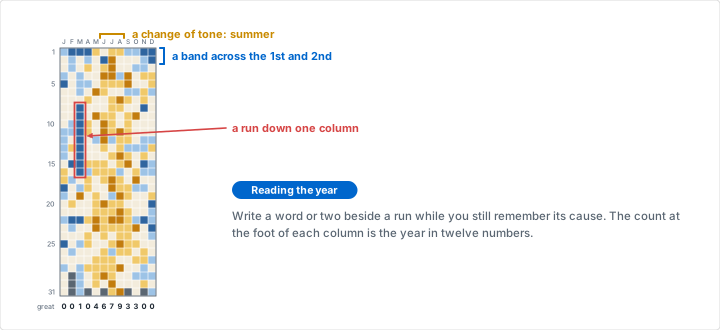
- Runs down a column. A week or more of one color is a stretch with a cause. Write a few words about it in the notes block while you still remember what it was.
- Bands across the columns. If the same dates are dark in several months, look for something on a monthly cycle: a bill, a deadline, a recurring commitment.
- A change in tone from column to column. Seasons show up here, as the slow drift of the year from one end of the key toward the other.
- A pattern every seven rows, if you dotted the Sundays. A weekly rhythm is the one pattern a sheet without weekdays will not show you unaided.
Treat what you find as a question rather than a conclusion. A sheet of colored squares records how you rated each day, not why, and it is most useful as a prompt to look at what was going on that month.
On a Wall, in a Journal, or on a Tablet
The Letter and A4 sheets are sized for a desk or a folder. The same layout works at three other scales.
- A poster for the wall. Tabloid at 0.45 inches prints 22 squares across x 35 down: the 13 calendar columns, 9 for the key, and three rows under the dates. On metric paper, A3 at 12 mm prints 23 x 33. Squares this large fill quickly with a broad marker, which suits a family or classroom sheet.
- A page in an A5 journal. A5 at 5 mm prints 25 x 38, which matches the 5 mm spacing most dotted journals use and drops into the notebook with no trimming. For a US half-size planner, Half Letter at 0.2 inches prints 22 x 37. Squares this small fill best with a sharp pencil or a fine pen, and they are the smallest that still read as squares rather than dots.
- A tablet template. Export the sheet as a 300 DPI PNG or an SVG, import it into a note-taking app as a page template, and color it with a stylus. Our guide to digital graph paper for tablet apps covers the import. The colors never run dry and the key never drifts, at the cost of a sheet you can see from across the room.
If you keep a journal already, glue or tape the A5 sheet in beside the future log, the twelve-month overview near the front that our bullet journaling tutorial sets up. Both are pages you come back to all year, and keeping them together means the year sheet is never more than a page away.
Choosing Your Settings
| Where the sheet lives | Paper and grid size | Squares | Room beside and below |
|---|---|---|---|
| A desk or folder, US | Letter, 0.3 in | 25 x 33 | 12 key columns, 1 tally row |
| A desk or folder, metric | A4, 8 mm | 23 x 34 | 10 key columns, 2 spare rows |
| A wall poster, US | Tabloid, 0.45 in | 22 x 35 | 9 key columns, 3 spare rows |
| A wall poster, metric | A3, 12 mm | 23 x 33 | 10 key columns, 1 tally row |
| An A5 journal | A5, 5 mm | 25 x 38 | 12 key columns, 6 spare rows |
| A half-size planner | Half Letter, 0.2 in | 22 x 37 | 9 key columns, 5 spare rows |
Every row uses the standard grid in gray at the light weight. Check the square count under the preview before you print. If it does not match the table, a margin or the grid unit has been changed, and the calendar will not fit the way the layout above assumes.
Mistakes That Spoil a Year
Mistake: Leaving the Missing Days Open
Problem: February 29, 30 and 31 are left as empty squares. On March 1 the next empty square in sight is in the wrong column, and a day gets colored into a date that does not exist.
Solution: Cross out all seven squares during setup: February 29, 30 and 31, and the 31st of April, June, September and November.
Mistake: Too Many Colors
Problem: The key has nine moods, two of them nearly the same shade. Every evening becomes a small debate, the debates get skipped, and the column for April is half empty.
Solution: Five colors in one ordered scale, strong at both ends and pale in the middle. If a day falls between two, take the one nearer ordinary and move on.
Mistake: A Strong Color for Ordinary Days
Problem: The ordinary day is a bright orange because it looked cheerful in the box. Half the year is ordinary, so the sheet is half orange, and the good and hard days are lost in it.
Solution: Give the most common color the palest shade, and save the strong colors for the ends of the scale.
Mistake: A Template Too Small to Color
Problem: The year is squeezed into a quarter of the page at 4 mm squares. Colored pencil runs over the edges, neighboring days blur together, and by summer the sheet is a smudge.
Solution: Use the full sheet: 0.3 inch squares on Letter or 8 mm on A4. Keep the small sizes for a journal page and fill them with a fine pen.
Conclusion
A year in pixels is a tracker built for the long view. It asks ten seconds a day and gives back the one thing a month at a time cannot: every day of the year on one sheet, where a stretch, a season and a habit all show up as color.
Print the sheet at 0.3 inches on Letter or 8 mm on A4, letter the months and number the dates, cross out the seven days that do not exist, and color five swatches in one ordered scale before January 1. Then fill one square a day and count each month at its foot. It is one of the quieter screen-free projects on graph paper, and in December it is the only tracker you will want to keep.
Print Your Year in Pixels
Standard grid, 0.3 inch squares on Letter, gray lines at the light weight: 25 squares across and 33 down, room for twelve months, a tally row and a key. Free, with no account and nothing to install.
Create Your Year SheetRelated Resources
- The Hexagon Habit Tracker: one numbered month, for starting a habit the year sheet will follow
- Bullet Journaling on Graph Paper: where a year page sits among the other spreads
- Creating Pixel Art on Graph Paper: the one square, one color discipline the name borrows
- Dot Grid Paper: the journal ruling a hand-drawn tracker usually starts on
- Digital Graph Paper for Tablet Apps: the same sheet as a page template you color with a stylus
- Cross-Stitch and Knitting Patterns: charting a temperature blanket before it is knitted
- October, A Month of Ink: another daily practice planned on one printed sheet
- Screen-Free Projects on Graph Paper: more reasons to keep a sheet of paper around