Hexagonal Graph Paper: The Complete Hex Grid Guide
Hexagonal graph paper, often called "hex paper," features a tessellating pattern of regular hexagons that creates unique spatial relationships impossible with square grids. This specialized grid system is essential for board game design, wargaming, organic pattern creation, and situations requiring equal-distance relationships in six directions. This comprehensive guide explores the mathematics, applications, and techniques for working with hexagonal grids.
What is Hexagonal Graph Paper?
The Geometry of Hexagons
A regular hexagon has:
- Six equal sides: All sides are the same length
- Six equal angles: Each interior angle is 120°
- Three axes of symmetry: Lines through opposite vertices
- Perfect tessellation: Hexagons fit together with no gaps
Hex Orientations
Flat-Top Hexagons
Hexagons with flat edges at top and bottom:
- Columns are vertical and offset
- Rows are horizontal and aligned
- Common in board games and wargames
- Natural for north-south oriented maps
Pointy-Top Hexagons
Hexagons with vertices (points) at top and bottom:
- Rows are horizontal and offset
- Columns are vertical and aligned
- Common in computer games and simulations
- Natural for east-west oriented maps
Choosing Orientation
The choice between flat-top and pointy-top is often based on the primary direction of movement in your application. For games with north-south movement, flat-top is easier. For east-west emphasis, pointy-top works better. Either can work for any application - it's mostly preference.
This generator prints pointy-top hexagons - a vertex at the top and bottom of each cell, with vertical edges down the left and right. That is the orientation chemistry uses, which is why it suits drawing organic structures. If you want flat tops, turn the printed sheet ninety degrees: the two are the same tiling seen from different sides.
Why Hexagons?
Advantages Over Square Grids
- Equal distances: All six neighbors are equidistant from center
- Natural movement: More realistic representation of terrain and movement
- Organic appearance: Less rigid and mechanical than squares
- Optimal packing: Most efficient way to divide 2D space (found in nature)
- Smooth curves: Better approximation of circular areas
- No diagonal ambiguity: Six clear directions instead of four orthogonal plus diagonals
Disadvantages
- More complex coordinate systems
- Doesn't align with rectangular paper and screens naturally
- Printing and cutting can be more difficult
- Less intuitive for precise measurement
- Mathematical calculations more complex than Cartesian coordinates
Generate Hexagonal Graph Paper
Grid Information
Generate and Print
Graph Paper Preview
Applications of Hexagonal Graph Paper
Board Games and Wargaming
Strategy Games
- Wargames: Classic hex-and-counter wargames use hexagonal boards for tactical combat
- Civilization-style games: Territory control and expansion with realistic adjacency
- Resource management: Tile-based games like Settlers of Catan use hex tiles
- Miniature wargaming: Movement and range measurement in tabletop battles
Game Design Advantages
- Consistent movement costs in all directions (no cheaper diagonal movement)
- Each hex has exactly six neighbors for simple adjacency rules
- Line-of-sight calculations are more natural
- Range and area-of-effect calculations are simpler
- Terrain features look more organic
Digital Game Development
Video Game Design
- Turn-based strategy: Games like Civilization series use hex grids
- Tactical RPGs: Combat positioning and movement
- Puzzle games: Match-3 variants and spatial puzzles
- Management sims: City building and resource allocation
For 3D isometric game art and level design, combine hex grids with isometric projection techniques.
Level Design
- Plan hex-based game levels on paper first
- Design encounter zones and spawn points
- Map resource locations and strategic positions
- Test balance and flow before digital implementation
Science and Mathematics
Chemistry
- Benzene rings: Hexagonal structure of aromatic compounds
- Crystal structures: Many materials form hexagonal lattices
- Molecular modeling: Graphene and other hexagonal carbon structures
- Honeycomb structures: Studying natural hexagonal formations
Organic chemistry is the largest single use of hex paper outside gaming, because a skeletal structure is drawn at exactly the 120-degree angles a hexagon already has: one cell of the rule is one six-membered ring, and fused systems are neighboring cells. Our guide to drawing organic chemistry structures on hexagonal paper covers setting the bond length, orienting the sheet, and the parts of a course -- five-membered rings, chair conformations, projections -- where the rule is no help at all.
Biology
- Honeycomb cell structure analysis
- Compound eye hexagonal ommatidia
- Pattern formation in nature
- Cellular automata and simulation
Physics and Engineering
- Graphene material studies
- Honeycomb panel design
- Hexagonal antenna arrays
- Crystal lattice modeling
Art and Design
Geometric Patterns
- Islamic geometric patterns and tessellations
- Quilting and textile design
- Floor tile layouts and mosaics
- Decorative borders and frames
- Op art and modern geometric designs
Illustration
- Stained glass window designs
- Honeycomb and bee-themed art
- Futuristic/sci-fi backgrounds and textures
- Organic pattern compositions
Mapping and Spatial Planning
- Fantasy cartography: RPG world maps with hex-based regions
- Urban planning: Alternative street grid patterns
- Ecological studies: Territory mapping and spatial analysis
- Network topology: Hexagonal cellular network planning
Coordinate Systems for Hex Grids
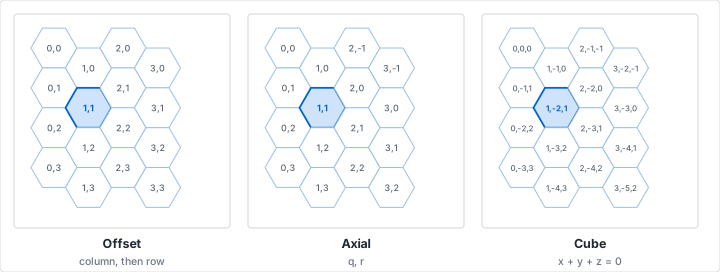
Offset Coordinates
Column Offset (Flat-Top)
Similar to standard (x, y) coordinates:
- Columns are numbered left to right
- Rows are numbered top to bottom
- Alternating columns are offset by half a row
- Simple to understand but math can be complex
Row Offset (Pointy-Top)
- Rows are numbered top to bottom
- Columns are numbered left to right
- Alternating rows are offset by half a column
- Similar complexity to column offset
Axial (Trapezoidal) Coordinates
Uses two axes at 120° to each other:
- More elegant for hex-specific mathematics
- Distance calculations become simpler
- Rotation and reflection are easier
- Widely used in game development
Cube Coordinates
Three coordinates (x, y, z) with constraint x + y + z = 0:
- Most mathematically elegant system
- Distance is simple: (|Δx| + |Δy| + |Δz|) / 2
- Rotations are simple 120° permutations
- Redundancy (third coordinate derived) trades space for simplicity
- Preferred by many game developers
Numbering the Hexes
A hex grid is much more useful once the cells are labeled, and the generator will print the numbers for you rather than leaving you to write 200 of them by hand. Switch Cell Numbers on in the hexagonal options and each cell is numbered in reading order -- left to right along the top row, then left to right along the next, and so on down the sheet.
Two inputs control the range. Numbers From sets the first value, so a sheet can start at 1, at 0, or at any number you like when it continues a set you have already drawn. Numbers To sets the last: leave it empty and every cell on the page is numbered, or give it a value and numbering stops there while the remaining cells print blank. That combination covers the two things people actually want numbered hexes for.
Monthly Trackers and Habit Grids
Set the range to 1 through 31 and you have a month, one hexagon per day, which is the reason numbered hex sheets turn up in planners at all. The tessellation gives every cell six neighbors instead of four, so a filled-in month reads as a continuous shape rather than a row of ticks, and a broken streak is visible at a glance. Empty cells beyond 31 leave room for a key or a note without a second sheet. It works the same way for anything counted in a fixed run -- a 30-day challenge, a 100-day project, a set of numbered swatches. Our bullet journaling tutorial covers the spread conventions this drops into, and the same sheet can be exported as a template for a note-taking app if you keep the journal on a tablet -- see digital graph paper for tablet apps. Our article on the hexagon habit tracker goes into the fill conventions, the cell size that leaves room to write beside the number, and what to do with the days you miss.
Numbered Maps for the Table
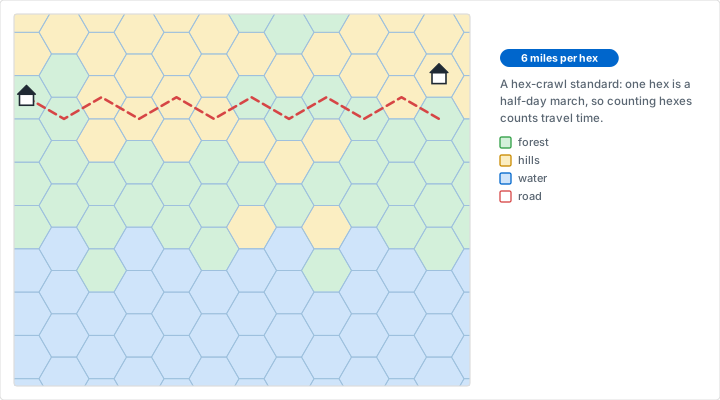
The other use is referencing. A numbered hex map lets a referee say "the ruins are in 47" instead of describing a position, and it makes an encounter table or a key that lists contents by cell number possible at all. This is the older convention, and it is why hex crawls are written the way they are: the number is the address, and everything else -- terrain, encounters, what is hidden there -- hangs off it in a separate list. Our article on tabletop RPG maps goes into how a keyed map is built and run.
Reading order numbering is the simplest scheme and the one most hand-drawn maps use, but it is not the only one. Published hex crawls often use a column-and-row code instead -- 0703 for the third hex down column seven -- because it survives extending the map in any direction, whereas sequential numbering has to be redone the moment you add a row at the top. If you expect the map to grow, number the sheet sequentially for convenience and write the column-row code on the cells that matter, or use the offset coordinates described above as your reference scheme and leave the printed numbers as a drawing aid.
Choosing a Cell Size for Numbers
One thing to know before setting the size: with the hexagonal style selected, the size field relabels itself Hex Radius, because that is what it sets -- the distance from the center of a cell to a corner, not the width of the cell. A hexagon measures its radius times √3 across the flats and twice its radius from point to point, so a radius of 15 mm draws a cell about 26 mm wide and 30 mm tall. It is the one number on the panel that is not the dimension you are probably picturing.
The numbers scale with the cell rather than staying a fixed size, which puts a floor on how small the grid can usefully go. Below about 6 mm of radius -- a cell roughly 10 mm across -- the numbers stay legible on screen but print as smudges on anything but a laser printer, and they crowd whatever you meant to draw in the cell. A radius of 15 mm, or 0.6 inches, is comfortable for a tracker: big enough to write a number and a mark in the same cell. For a keyed map where a terrain symbol has to share the cell with its number, go larger still.
Sheet size then decides how many cells you get, and the numbered range is independent of it. A 1 to 31 range on A4 at a 15 mm radius numbers the top few rows and leaves the rest of the sheet blank, which is useful if you want a key beside the month. If you would rather the numbered cells fill the page, raise the grid size until they do.
Working with Hex Paper
Counting Distance
Adjacent Hexes
Distance of 1: Hexes that share an edge are distance 1 apart.
Longer Distances
To find distance between two hexes:
- Count the minimum number of hex-to-hex moves needed
- You can move through any of the six adjacent hexes each step
- Find the shortest path (there may be multiple equally short paths)
Distance Example
From hex A to hex B that's 3 hexes east and 2 hexes northeast: The distance is simply the maximum of the two directional components. In this case, max(3, 2) = 3. (This assumes cube coordinates; offset coordinates require more complex formulas.)
Drawing on Hex Paper
Filling Regions
- Outline the boundary of your region
- Fill hexes that are completely inside
- Make decisions about edge hexes (include or exclude)
- Use shading or colors to differentiate regions
Creating Circular Areas
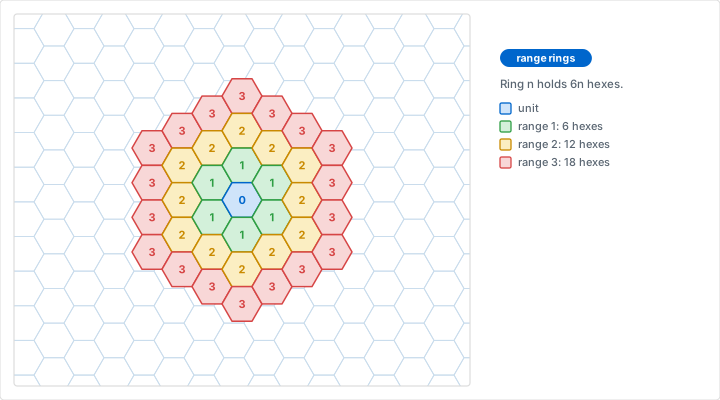
- Choose center hex
- Count outward in all six directions for the radius
- Fill all hexes within that distance
- Result: Rough circle (more hexagonal the smaller the radius)
Line Drawing
Drawing lines on hex grids:
- Straight lines follow a series of hexes in one of six directions
- Diagonal lines step alternately between two of the six directions
- Curves approximate smooth arcs better than square grids
Symbols and Annotations
Hex Center Marks
- Small dots or symbols in hex centers for numbering
- Icons representing terrain types or game elements
- Resource markers or victory point indicators
Edge Markers
- Walls or boundaries between hexes
- Rivers or roads along hex edges
- Connections or relationships between adjacent hexes
Vertex Markers
- Points where three hexes meet
- Settlement locations in games like Catan
- Junction points for networks
Game Design on Hex Grids
Board Game Creation
Map Design Process
- Determine board size: Count hexes across and down
- Plan key locations: Mark important strategic positions
- Distribute terrain types: Create varied, balanced landscape
- Add features: Resources, obstacles, special locations
- Test movement: Verify accessibility and balance
- Refine: Adjust based on playtesting
Terrain Types
Common game terrain on hex maps:
- Plains/grassland: Normal movement, often default terrain
- Forest: Defensive bonus, slower movement
- Hills: Height advantage, visibility
- Mountains: Impassable or very difficult terrain
- Water: Impassable except by special units or crossing points
- Desert: Harsh terrain with special rules
- Urban: Cities, towns, roads
Movement Systems
Simple Movement
- Each unit moves N hexes per turn
- All adjacent hexes cost 1 movement point
- Simple, fast, easy to understand
Terrain-Modified Movement
- Different terrain costs different movement points
- Example: Plains = 1, Forest = 2, Hills = 3
- Adds strategic depth and terrain importance
Zone of Control
- Units control/threaten adjacent hexes
- Moving through enemy ZOC has consequences
- Adds tactical positioning importance
Combat and Range
Adjacent Combat
- Simplest: Units fight in hexes next to each other
- Must be in one of the six adjacent hexes to attack
Ranged Combat
- Count hex distance for range
- Example: Range 3 weapon can hit any hex within 3 moves
- Line of sight may be affected by terrain in intermediate hexes
Area Effects
- Specify radius in hexes (e.g., "all hexes within 2 of target")
- Creates roughly circular effect areas
- Easy to visualize and calculate
Patterns and Tessellations
Basic Hex Patterns
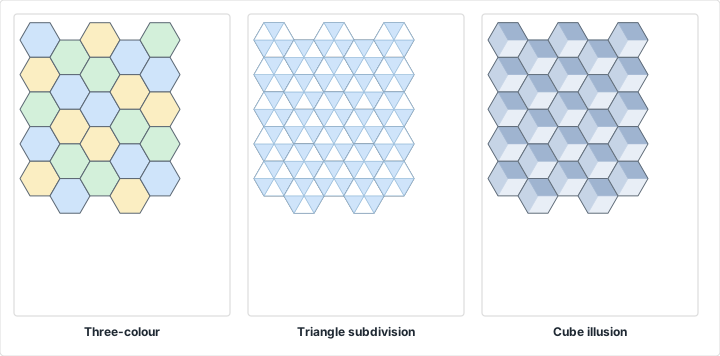
Honeycomb
- Simple repeating hexagon pattern
- Most common and basic hex tessellation
- Can vary hex size for different effects
Flower of Life
- Overlapping circles forming hexagonal pattern
- Sacred geometry and spiritual symbolism
- Creates beautiful, intricate designs
Hexagonal Star Patterns
- Six-pointed stars formed from hexagons
- Common in Islamic art and architecture
- Complex interlocking patterns
Color and Shading Patterns
Alternating Colors
- Checkerboard effect with hexagons
- 3-color patterns (each hex touches all three colors)
- Gradient effects across hex fields
Radial Patterns
- Concentric rings of hexagons
- Color or shade based on distance from center
- Create mandala-like designs
Advanced Techniques
Hex Grids with Varied Sizes
- Mix large and small hexagons for effect
- Large hexes for territories, small for details
- Nested hex grids at different scales
Partial Hexagons
- Cut hexagons at edges to fit rectangular boundaries
- Create irregular borders and coastlines
- Blend hex grid with freeform areas
3D Hexagonal Structures
- Hexagonal prisms for 3D game boards
- Stacking hexes for elevation
- Honeycomb 3D structures
Common Challenges and Solutions
Challenge 1: Fitting Hexes to Rectangular Paper
Problem: Hexagonal grids don't align perfectly with rectangular paper edges.
Solution: Accept partial hexagons at edges, or plan dimensions to minimize waste. Use online hex grid generators that can optimize for standard paper sizes.
Challenge 2: Complex Distance Calculations
Problem: Calculating distances isn't as simple as Pythagorean theorem.
Solution: Learn and use cube coordinate system. Distance formula becomes much simpler: max(|Δx|, |Δy|, |Δz|) or (|Δx| + |Δy| + |Δz|) / 2.
Challenge 3: Orientation Confusion
Problem: Mixing flat-top and pointy-top in same project causes issues.
Solution: Choose one orientation at project start and stick with it. Note it clearly in documentation if working with others.
Challenge 4: Unbalanced Game Maps
Problem: Starting positions have different advantages due to map layout.
Solution: Use rotational symmetry when designing competitive maps. Place mirrored resources and terrain for each player/faction.
Hex Paper Specifications
Measuring Hexagons
Key Dimensions
- Side length (s): Length of one edge
- Width (flat-to-flat): 2s for flat-top, s√3 for pointy-top
- Height (point-to-point): s√3 for flat-top, 2s for pointy-top
Common Sizes
- Small hex (¼" sides): 6mm, good for detailed work
- Medium hex (½" sides): 12mm, general purpose
- Large hex (1" sides): 25mm, board games and sketching
Line Weight and Visibility
- Light lines (0.25-0.5pt): Subtle guide that won't interfere with content
- Medium lines (0.5-1pt): Standard, good balance of visibility and subtlety
- Heavy lines (1-2pt): Very visible, good for presentations and displays
Tools and Resources
Drawing Tools
- Hex templates: Physical templates for drawing perfect hexagons
- Colored pencils/markers: For filling and shading hexes
- Fine-tip pens: For detailed work and notation
- Ruler: For measuring and creating straight edges
- Compass: For creating circular areas on hex grid
Digital Tools
- Hex map generators and editors
- Vector graphics programs with hex grid options
- Game development engines with hex grid support
- Online hex coordinate calculators
Practice Projects
Beginner Projects
Project 1: Simple Board Game
Design a simple race game on a hex grid. Create a winding path through different terrain types. Add start, finish, and special spaces.
Project 2: Honeycomb Pattern
Create a decorative honeycomb pattern by selectively filling hexagons with color. Try gradient effects or geometric patterns.
Project 3: Territory Map
Design a fantasy map with different territories. Use color or shading to distinguish regions. Add borders between territories.
Intermediate Projects
Project 4: Tactical Combat Map
Create a map for tactical combat with varied terrain, obstacles, cover positions, and interesting tactical choices. Include elevation if possible.
Project 5: Geometric Art
Design complex geometric art using hexagonal tessellations. Incorporate symmetry, color theory, and Islamic-inspired patterns.
Project 6: Puzzle Design
Create a hex-based puzzle game. Could be path-finding, tile-matching, or strategic placement. Design at least 5 levels of increasing difficulty.
Advanced Projects
Project 7: Full Board Game
Design a complete board game with hex-based movement, resources, combat, and victory conditions. Create rules, test, and iterate.
Project 8: Hex Coordinate System
Implement a full coordinate system (cube or axial). Write algorithms for distance, line-of-sight, pathfinding, and area effects. Code it or work through examples on paper.
Project 9: World Map
Create a detailed world map for an RPG campaign using hexes. Include multiple terrain types, regions, cities, roads, and points of interest. Make it large and detailed.
Conclusion
Hexagonal graph paper offers unique advantages for game design, pattern creation, and spatial problem-solving. While more complex than square grids, hexagons provide more natural movement, equidistant neighbors, and organic appearances that make them ideal for many applications. From classic wargames to modern video games, from chemical benzene rings to decorative Islamic art, hexagonal grids are a versatile and powerful tool.
Start with simple projects to understand hex grid basics, experiment with different orientations and coordinate systems, and gradually tackle more complex designs. The initial learning curve is worth the effort - hexagonal grids unlock creative possibilities unavailable with square grids.
Related Resources
- Designing Board Games on Graph Paper
- Designing Video Game Levels and Maps on Graph Paper
- Drawing Dungeon Maps on Graph Paper
- Organic Chemistry Structures on Hexagonal Paper
- Design Sketching on Graph Paper
- How to Choose the Right Grid Size
- Graph Paper Use Cases
- Frequently Asked Questions