Designing Board Games on Graph Paper: From Concept to Prototype
The tabletop game industry generated over $13 billion in global revenue in 2025, and it is still growing. Crowdfunding platforms launched more than 4,000 tabletop game campaigns last year alone. Behind every published board game -- from mass-market hits to indie Kickstarter successes -- there is a paper prototype. Not a digital mockup. Not a 3D render. Paper. And the most effective paper prototype starts with a grid. Graph paper gives game designers what no blank sheet can: consistent spacing, measurable distances, and a structure that turns rough ideas into playable boards in minutes rather than hours.
Why Paper Prototyping Still Comes First
Professional game designers at studios and independent creators working from kitchen tables follow the same workflow: concept, paper prototype, playtest, iterate, repeat. Digital tools come later. The reason is speed. A board drawn on graph paper can be modified between playtests in seconds -- cross out a path, draw a new one, add a space, remove a penalty zone. Software requires opening files, adjusting layers, reprinting. Paper requires a pencil and an eraser.
Reiner Knizia, designer of over 700 published games, has described his process as starting with pencil sketches on grid paper. Jamey Stegmaier, creator of Scythe and Wingspan, prototyped on paper for months before touching a computer. The reason is not nostalgia -- it is efficiency. Paper prototypes answer the most important question in game design faster than any other method: is this fun to play?
Graph paper specifically solves problems that blank paper cannot. It provides:
- Consistent space sizing: Every square, hex, or dot intersection is the same size, so game spaces are uniform without measuring each one.
- Distance calculation: Movement costs and ranges can be counted directly from the grid.
- Symmetry verification: Balanced boards require symmetrical layouts, and grid lines make asymmetry immediately visible.
- Scale control: The grid sets a fixed scale, so the board fits the intended table space.
- Rapid iteration: Erase and redraw without starting over. The grid stays; only your design changes.
Choosing the Right Grid for Your Game
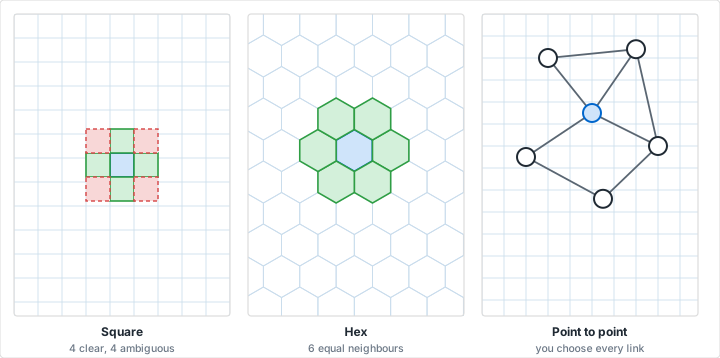
The grid you choose is not a cosmetic decision. It determines how players move, how territory is divided, how combat works, and how the board feels. Different game genres map naturally to different grid types.
Square Grid -- The Workhorse
Standard square graph paper is the starting point for most board game prototypes. Squares are intuitive: players understand rows and columns without explanation. Movement is straightforward -- one space up, down, left, or right.
Best for:
- Race games: Linear or branching paths are easy to draw along grid lines. Think Candy Land, Snakes and Ladders, or custom track designs.
- Dungeon crawlers: Room-and-corridor layouts map directly to squares. Each square is a floor tile.
- Abstract strategy: Chess, checkers, and Blokus all use square grids. If your game involves placing or moving pieces on a grid, start here.
- Tile-laying games: Carcassonne-style tile placement prototypes well on squares, where each square represents one tile.
- City builders: Zoning and building placement games (Suburbia, Quadropolis) use grid-based layouts.
Grid recommendation: 1/4-inch or 1/2-inch spacing depending on component size. Use 1/2-inch if you need room to write text in each space. Use 1/4-inch for larger boards where individual spaces are secondary to regions.
The Diagonal Problem
Square grids have a known issue: diagonal movement covers more distance than orthogonal movement (1.41x, to be exact). If your game allows diagonal movement, decide early whether diagonals cost 1 or 2 movement points. Many games simply prohibit diagonal movement to avoid this entirely. Others alternate: the first diagonal costs 1, the second costs 2, repeating. Decide during prototyping, not after you have printed 500 copies.
Hexagonal Grid -- The Strategy Standard
Hexagonal grids solve the diagonal problem completely. Every adjacent hex is exactly the same distance from the center hex. This makes hex grids the default for wargames, 4X strategy games, and any design where spatial relationships and distance matter.
Best for:
- Wargames: Hex-and-counter games (the genre that made hex grids famous) use hexes to represent terrain and unit positions. Movements and ranges are counted in hex steps.
- Exploration games: Catan's board is built from hexagonal terrain tiles. Hex grids create organic-looking maps that feel less rigid than square grids.
- Area control: Hexes divide territory more evenly than squares and create more interesting adjacency decisions (six neighbors instead of four or eight).
- Abstract games: Hive, Ingenious, and many abstract strategy games use hexagonal placement.
Grid recommendation: Use hexagonal graph paper with 1/2-inch or 3/4-inch hexes for prototyping. Larger hexes allow room for terrain symbols, unit counters, or resource markers.
Isometric Grid -- 3D on Paper
Isometric graph paper provides a 30-degree angled grid that creates the illusion of three dimensions. This is valuable for games with elevation, stacking, or multi-level boards.
Best for:
- Stacking games: Games where pieces build upward (like Santorini) benefit from isometric prototyping to visualize height.
- Multi-level boards: Dungeon games with upper and lower floors, or games with terrain elevation.
- Presentation prototypes: When you want to show a publisher or crowdfunding audience what the game looks like in play, isometric views are more visually appealing than flat top-down grids.
Dot Grid -- Flexible Prototyping
Dot grid paper provides reference points without imposing a rigid structure. The dots guide your drawing while staying invisible in the final result. This is useful for games that do not use a traditional grid.
Best for:
- Point-to-point movement: Games like Pandemic or Ticket to Ride use node-and-edge maps rather than grids. Dot paper helps space nodes evenly.
- Freeform boards: Abstract games with irregular spaces or organic layouts.
- Card layout: Designing card faces and game component layouts where you need alignment guides but not visible lines.
Designing Your Game Board: Step by Step
Step 1: Define the Play Space
Before drawing anything, answer these questions:
- Table footprint: How much table space does your game occupy? A standard table accommodates boards up to about 20 x 20 inches alongside player areas. Measure the physical space available and set your paper size accordingly.
- Player count: More players generally need a larger board or more complex layouts. A 2-player abstract can use a small grid (8x8 to 12x12). A 4-6 player area control game might need a full tabloid sheet.
- Component size: If players place tokens, cards, or miniatures on the board, each space must be large enough to hold them. Standard meeples need about 3/4-inch squares. Cards in tableau need about 2.5 x 3.5-inch zones.
Mark the board boundary on your graph paper first. This prevents the common mistake of designing a board that is too large for the table or too small for the components.
Step 2: Sketch the Movement System
Movement is the core interaction in most board games. The grid you chose determines how movement works, but the specifics need to be designed:
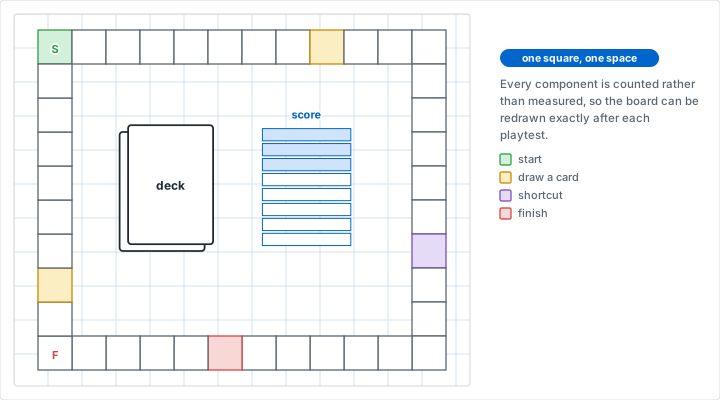
- Path games: Draw the path as a sequence of connected spaces. Use the grid to keep spacing uniform. Branch points, shortcuts, and loops should be clearly marked.
- Open grid games: The entire grid is the board. Mark starting positions, impassable terrain, and special zones. Use different symbols or colors for different terrain types.
- Node-and-edge games: Place nodes (cities, locations, waypoints) at grid intersections. Draw connections between them. The grid keeps nodes evenly spaced.
Test Movement Before Anything Else
The most common fatal flaw in amateur board game designs is movement that feels wrong -- too slow, too fast, too random, or too predictable. Before you add any other mechanics, place two tokens on your prototype board and move them around for five minutes. Can a player reach any area of the board in a reasonable number of turns? Are there dead zones that no one would want to enter? Does the board feel too cramped or too empty? Fix these problems now. No amount of clever cards or special abilities will save a board that does not feel right to move across.
Step 3: Zone the Board
Most board games have distinct regions with different functions. Use colored pencils or markers to define zones on your graph paper prototype:
- Starting areas: Where players begin. These should be equidistant from key resources or objectives in balanced games.
- Resource zones: Areas that produce or contain resources. Distribute these to create interesting movement decisions.
- Conflict zones: Areas where players are likely to interact, compete, or fight. These should be reachable from multiple directions.
- Scoring zones: End goals, victory point locations, or finish lines. Their placement relative to starting areas defines the game's overall arc.
- Neutral/buffer zones: Empty spaces that create distance between other zones. These control pacing -- more buffer space means slower games.
Color-coding zones on graph paper makes balance problems immediately visible. If one player's starting area has three resource zones within two moves and another has none, you can see it at a glance.
Step 4: Add Mechanics Layer by Layer
Resist the urge to design everything at once. Add one mechanic per prototype iteration and playtest after each addition:
- Iteration 1 -- Movement only: Can players move around the board in a way that feels good? Is the board the right size?
- Iteration 2 -- Add the core mechanic: If your game is about area control, add claiming. If it is about resource gathering, add resources. Test the single most important mechanic.
- Iteration 3 -- Add interaction: How do players affect each other? Trading, combat, blocking, or racing?
- Iteration 4 -- Add progression: How does the game state change over time? Depletion, escalation, unlocking new areas?
- Iteration 5 -- Add the end condition: How does the game end and who wins? Test whether the end condition creates satisfying final turns.
Each iteration gets its own graph paper prototype. Number them and keep the old versions. You will want to go back to iteration 3 when iteration 5 reveals a problem you introduced in iteration 4.
Prototyping Components Beyond the Board
Cards
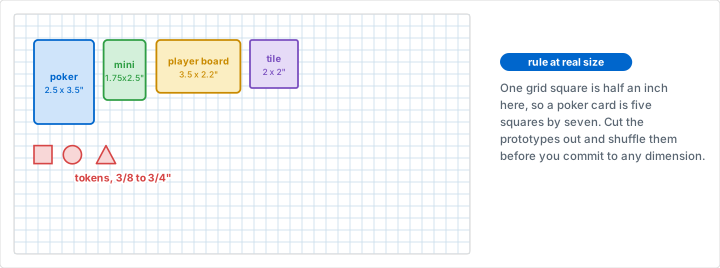
Graph paper makes card prototyping fast and consistent. A standard card is 2.5 x 3.5 inches (63.5 x 88.9 mm). On 1/4-inch graph paper, that is 10 x 14 squares -- easy to draw and replicate.
- Draw the card outline: 10 x 14 squares on 1/4-inch paper.
- Divide the interior: title zone (top 2 rows), art zone (middle 6 rows), text zone (bottom 4 rows), cost/value (corners).
- Write the card text directly on the grid. The lines keep your handwriting aligned.
- Cut out the cards and sleeve them with a playing card behind for rigidity.
For a deck of 50+ cards, create a template card on graph paper, then photocopy it and fill in individual card details by hand. This is faster than designing each card from scratch.
Tokens and Tiles
Square tokens are trivial on graph paper -- draw a square, write or draw what the token represents, and cut it out. For hexagonal tiles, use hexagonal graph paper and cut along the hex boundaries.
Resource tokens work best at 1/2-inch to 3/4-inch squares. Smaller tokens are hard to pick up; larger ones clutter the board. Prototype at the size you intend for production so playtesting reveals ergonomic problems early.
Player Boards
Many modern games include individual player boards for tracking resources, abilities, or progress. Graph paper is ideal for these:
- Use a full sheet of graph paper per player board.
- Divide it into labeled zones: resource tracks, card slots, ability markers, score track.
- Use the grid to align everything precisely. Misaligned player boards cause confusion during playtesting.
Balancing Your Game on Paper
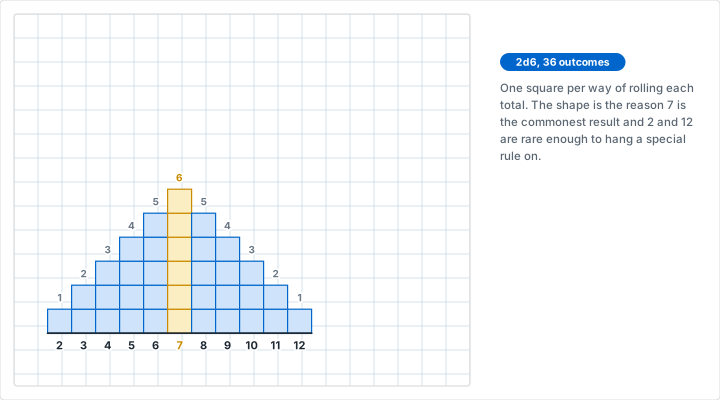
Balance is the difference between a game that gets played once and one that gets played fifty times. Graph paper's grid structure makes several balance techniques visual and intuitive.
Symmetry Testing
Fold your board prototype in half (or in quarters for 4-player games). Hold it up to a light. If the board is meant to be symmetric, you will instantly see where it is not. Asymmetric games require more careful analysis, but the fold test catches accidental asymmetry that creeps in during freehand drawing.
Distance Mapping
Pick any space on the board and count how many moves it takes to reach every other space. Write the distance in each space (in pencil -- you will erase these). This distance map reveals:
- Bottlenecks: Spaces that are far from everything, creating chokepoints or dead zones.
- Shortcuts: Paths that are too efficient, letting players skip intended challenges.
- Pacing: Whether the game's geography creates the tempo you want. A race game needs a clear fastest path with tempting but risky shortcuts. A strategy game needs multiple equally viable routes.
Resource Distribution Analysis
Mark every resource location on the board with a colored dot. Step back and look at the distribution. Clusters mean some board positions are objectively better than others. Even distribution means all positions are equally viable (good for symmetric games). Deliberate imbalance can create interesting decisions if players draft starting positions.
Playtesting with Paper Prototypes
Running a Playtest Session
Paper prototypes have a specific advantage over polished digital prototypes: players know the game is unfinished. This makes them more willing to give honest feedback and suggest changes. Nobody wants to criticize a beautiful production copy. Everyone feels comfortable criticizing a hand-drawn board.
- Print fresh copies: Start each playtest session with a clean board. Yesterday's eraser marks and annotations create confusion.
- Explain the rules verbally: If you cannot explain your game in under five minutes, the rules are too complex for the current prototype stage. Simplify.
- Watch, do not play: As the designer, observe. Do not take a seat at the table. Watch where players hesitate, where they make mistakes, and where they stop reading cards to ask questions.
- Take notes on the board: When something does not work, write directly on the prototype board with a red pen. Circle problem areas. This annotated board becomes your revision guide.
- Ask three questions after: What was the most fun part? What was the most confusing part? Would you play this again?
What to Track
Keep a separate sheet of graph paper as a playtest log. Draw a simple table:
- Column 1: Turn number
- Column 2: Game time elapsed
- Column 3: Player scores or positions
- Column 4: Notable events or decisions
This data reveals pacing problems. If scores diverge early and never reconverge, the game has a runaway leader problem. If turns take progressively longer, the game has an analysis paralysis problem. If all scores cluster together until a random final turn decides the winner, the game has an insufficient-agency problem. Graph paper tracking makes these patterns visible across multiple playtests.
Game Design Patterns by Genre
Different game genres have established patterns that work well on specific grid types. Use these as starting points, not rigid rules.
Worker Placement
Draw action spaces as distinct squares on the grid. Each space should be large enough for one or more worker tokens. Connect related actions with lines or group them into color-coded zones. The grid keeps action spaces evenly spaced and readable. Start with 2-3 actions per player, then add more in later iterations.
Deck Building with a Board
The board serves as a market or tableau. Draw a row of card-sized rectangles (10 x 14 squares on 1/4-inch paper) for the supply. Add player areas at the edges. The grid ensures card slots are uniform so players can quickly scan the available options.
Area Control / Territory
Hex grids are the standard. Define territories as groups of hexes outlined in heavy lines. Each territory should contain 3-7 hexes. Fewer feels insignificant; more becomes hard to defend. Color-code territories and mark border hexes distinctly -- border disputes are where the interesting decisions happen.
Cooperative / Solo
Cooperative games often use a central threat track alongside the main board. Draw the board on one sheet and the threat/event track on another. The separation helps players focus on the spatial puzzle (the board) without losing track of the timer mechanic (the track).
Roll-and-Write
Roll-and-write games are graph paper games. The player sheet is the game. Design a grid of spaces that players fill in based on dice rolls or card draws. Test different grid sizes (6x6, 8x8, 10x10) to find the right density. Too few spaces and the game ends too quickly. Too many and the grid never feels complete, which is unsatisfying.
The Roll-and-Write Explosion
Roll-and-write is one of the fastest-growing board game genres. Games like Cartographers, Welcome To, and Railroad Ink sell millions of copies. The entire game is a printed sheet -- which means the prototype and the product are nearly the same thing. If you are designing your first game, a roll-and-write on graph paper is the lowest-friction path from idea to finished product.
From Paper to Production
A paper prototype is not the final product, but it contains all the design information you need to create one. When your prototype has survived multiple playtest sessions and you are confident in the design, the transition looks like this:
- Photograph or scan your final prototype. This becomes the reference for digital layout.
- Count grid squares for exact measurements. If your board is 24 x 24 squares on 1/4-inch paper, the production board is 6 x 6 inches. Scale up as needed.
- Transfer zone boundaries to digital tools. The zones, paths, and regions you drew on graph paper define the vector shapes in your layout software.
- Preserve the proportions. Your playtesting validated the spatial relationships at the prototype scale. Maintain those ratios in the final version.
Many successful indie game designers report that their final production boards look remarkably similar to their paper prototypes. The graph paper version established the spatial logic. The digital version added art and polish without changing the underlying design.
Common Mistakes in Board Game Prototyping
- Going digital too early. Software creates a false sense of completion. A beautiful digital board that has not been playtested is worse than an ugly paper board that has been playtested ten times.
- Making the board too large. New designers consistently overestimate how much board space their game needs. Start with a board that feels slightly too small. You can always add space later -- removing it means redesigning.
- Ignoring ergonomics. Players need to reach across the board, read text at a distance, and distinguish colors under varied lighting. Test your prototype in actual playing conditions, not just at your desk.
- Designing for one player count. If your game supports 2-5 players, prototype and playtest at every count. A board that works perfectly for 4 players may be empty with 2 or chaotic with 5.
- Skipping the boring parts. Scoring tracks, turn order markers, resource storage areas, and discard piles are not exciting to design. They are also the components that cause the most confusion when poorly designed. Give them grid space and attention.
- Not numbering prototypes. Write a version number and date on every prototype board. When you realize iteration 7 broke something that worked in iteration 4, you need to find iteration 4.
Conclusion
Every board game starts as an idea. The fastest way to turn that idea into something you can play, test, and improve is to print a sheet of graph paper, pick up a pencil, and start drawing. The grid provides the structure. You provide the game. Square grids for classic movement and tile placement. Hex grids for strategy and exploration. Isometric grids for 3D visualization. Dot grids for freeform layouts. The right grid type is already available -- pick one and start your first prototype today.
The distance between "I have a game idea" and "I have a playable prototype" is exactly one sheet of graph paper.
Ready to Design Your Game?
Print custom graph paper for your board game prototype. Choose square, hexagonal, isometric, or dot grid -- set your spacing to match your component sizes -- and start building something people want to play.
Create Graph Paper NowRelated Resources
- Hexagonal Graph Paper -- The standard grid for strategy and wargame design
- Isometric Graph Paper -- Visualize 3D board layouts and elevation
- Isometric Drawing on Graph Paper -- exploded views for showing box and component layout
- Dot Grid Paper -- Flexible prototyping for freeform board layouts
- How to Choose the Right Grid Size
- Graph Paper Use Cases Across Industries
- Design Sketching on Graph Paper
- Professional Printing Tips
- Designing Video Game Levels and Maps on Graph Paper
- Designing and Solving Grid Puzzles on Graph Paper