Woodworking and DIY Project Plans on Graph Paper
Before a single board is cut, a good woodworking project lives on paper. A clear, scaled drawing tells you exactly how much lumber to buy, where every joint lands, and whether the finished piece will fit through your shop door. Graph paper is the woodworker's oldest planning tool, and it remains the fastest way to turn a rough idea into a buildable plan. The pre-printed grid handles your measuring for you: every square is a known distance, so straight lines stay straight and proportions stay honest. Whether you are designing a bookshelf, a workbench, or a backyard shed, a sheet of graph paper and a sharp pencil will save you wood, money, and frustration.
Why Graph Paper for Woodworking
Computer-aided design software exists, and for production shops it is indispensable. But for the home woodworker and weekend DIYer, graph paper has advantages that no app can match:
- The grid does your measuring: Each square equals a fixed real-world distance. Count squares instead of measuring lines, and your drawing stays in proportion automatically.
- No learning curve: You can sketch a usable plan in minutes. There is no software to install, no menus to navigate, no subscription to pay.
- Think with your hands: Sketching forces you to consider proportion, joinery, and grain direction in a way that dragging boxes on a screen does not.
- It goes to the shop: A paper plan tapes to the wall above your bench. It does not need a battery, and sawdust does not crash it.
- Free to print: Pull a fresh sheet from our generator, pick your grid, and start drawing immediately.
- Easy revisions: Erase a line and redraw. Print a clean copy when the design firms up.
The goal is not a beautiful drawing. The goal is a plan accurate enough to build from and clear enough that you can read it three weeks later when you finally have a free Saturday. Graph paper gets you there faster than any other method.
Choosing a Scale
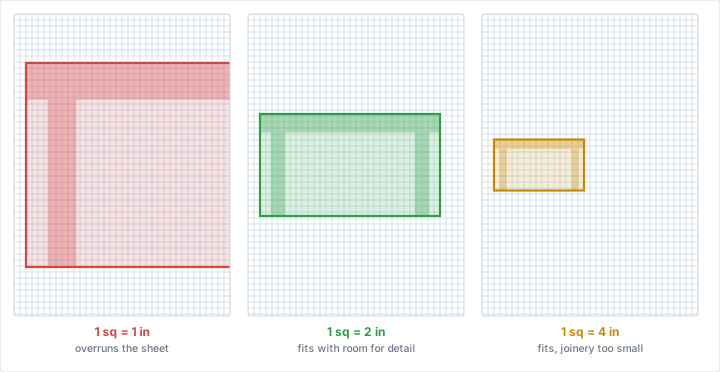
Scale is the relationship between distance on your drawing and distance on the real object. Choosing it well is the single most important decision in drafting a plan, because it determines whether your whole project fits on one readable sheet.
The One-Square Rule
The cleanest approach is to assign a real-world measurement to one grid square. On a standard quarter-inch grid, a common and intuitive choice is one square equals one inch. A board that is 12 inches wide spans 12 squares. A 30-inch-tall table leg runs 30 squares down the page. The mental math disappears, because counting squares is the same as counting inches.
The trouble is size. A 6-foot bookshelf at one-square-per-inch needs 72 squares of height, which overruns a letter-size sheet. When the project is large, scale down so the whole thing fits.
Common Woodworking Scales
- 1 square = 1 inch: Best for small projects -- boxes, drawer organizers, small shelves, jigs. Full detail, easy reading.
- 1 square = 2 inches: A good middle ground for furniture like nightstands, chairs, and small tables.
- 1 square = 3 inches: Useful for larger case pieces -- dressers, bookcases, cabinets.
- 1 square = 6 inches: For big builds: workbenches, beds, and large built-ins.
- 1 square = 1 foot: For sheds, decks, and room-scale layouts where you need the whole footprint on one page.
Quarter-inch grid paper is the woodworking standard, but it is not your only option. For tight detail work you may want a finer grid; for room-scale planning a coarser one reads better. Our guide to choosing grid size walks through the trade-offs, and you can set any spacing you like with our generator.
Always label the scale on the sheet. Write "Scale: 1 square = 2 inches" in the corner of every drawing. A plan without a stated scale is a guess waiting to happen, and a scale you remember today is a scale you will doubt next month.
Drawing to Scale
Once you have chosen a scale, drawing is mostly counting. Start with the overall bounding box of the piece -- the outermost dimensions of width and height -- and lightly sketch that rectangle by counting squares. This frame keeps everything that follows in proportion.
Work from the outside in. Place major components first: the top, the sides, the shelves. Then add structural details: rails, stiles, aprons, and stretchers. Save fine elements like edge profiles, hardware locations, and joinery marks for last. Keep lines on the grid wherever possible; a board edge that follows a printed line is automatically straight and square.
Draw Material Thickness
Beginners often draw boards as single lines. Draw them as the rectangles they really are. Three-quarter-inch plywood at one-square-per-inch is three-quarters of a square thick. Showing actual thickness reveals how parts overlap, how joints fit, and whether your shelf will clear the rail below it.
Orthographic Views: Top, Front, and Side
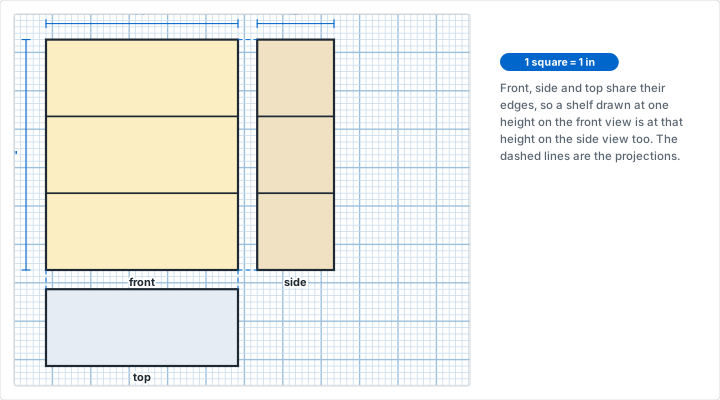
A single drawing cannot fully describe a three-dimensional object. The standard solution, borrowed from engineering and architectural drafting, is the orthographic projection: a set of straight-on views, each looking at the object from one direction.
- Front view (elevation): The face of the piece as you stand in front of it. This shows height and width and is usually the most informative single view.
- Top view (plan): Looking straight down. This shows width and depth -- the footprint of the piece on the floor or bench.
- Side view (profile): Looking from the end. This shows height and depth, and reveals details like leg taper, back-panel setback, and overhang.
Arrange the three views in the conventional layout: front view at the lower left, top view directly above it, side view directly to the right of the front. Aligning them this way lets dimensions carry across views -- the width in the front view lines up with the width in the top view -- which makes the drawing easier to read and easier to keep consistent. Graph paper makes this alignment effortless, since the same grid lines run through every view. Our pages on engineering graph paper and the broader topic of what graph paper is cover the grid conventions that make orthographic drawing clean.
Section Views
When a joint or interior detail is hidden inside the piece, draw a section view: an imaginary cut through the object that exposes what is inside. Mark the cut line on the main view with a labeled arrow ("Section A-A"), then draw the cut face at a larger scale off to the side. Section views are where you work out how a tenon seats in a mortise or how a drawer rides on its runners.
Dimensioning Your Plan
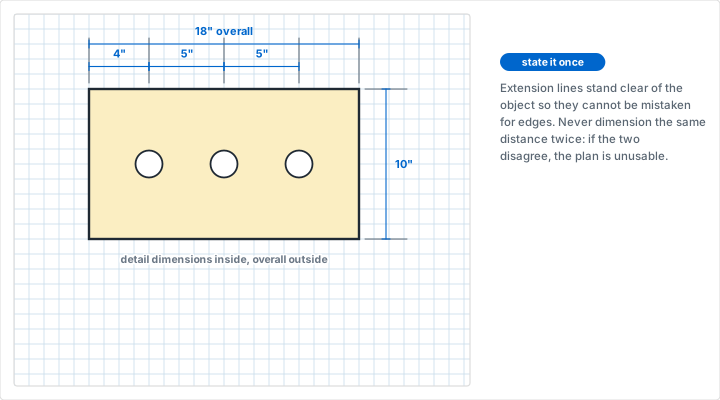
A scaled drawing tells you proportions, but the shop needs exact numbers. Dimensioning is the practice of writing real measurements onto the drawing so you never have to measure the page itself.
- Extension and dimension lines: Draw light lines extending from the two points you are measuring, then a dimension line between them with arrowheads at each end. Write the measurement in the gap or just above the line.
- Measure to the same reference: Where possible, dimension all parts from a single edge or baseline rather than chaining measurements end to end. Chained measurements accumulate error; baseline measurements do not.
- Overall before detail: Give the overall width, height, and depth first, then break those down into component dimensions. The detail measurements should always add up to the overall.
- Be explicit about thickness: Note material thickness for every part. A "1x4" board is actually three-quarters of an inch by three and a half inches, and forgetting that nominal-versus-actual gap is a classic source of parts that do not fit.
Pick one unit and stay with it. Mixing fractions and decimals, or inches and millimeters, invites mistakes at the saw. If you are working metric, our paper sizes guide covers A-series sheets and millimeter grids that pair naturally with metric dimensioning.
Building a Cut List
The cut list is the bridge between your drawing and the lumberyard. It is a simple table that names every part the project requires, and it is the single most useful document you will produce.
For each unique part, record:
- Part name: "Side panel," "Top," "Shelf," "Back rail."
- Quantity: How many identical copies you need.
- Dimensions: Thickness by width by length, in that conventional order.
- Material: Solid oak, three-quarter-inch plywood, poplar, and so on.
- Grain direction: Note which way the grain should run, especially on visible panels and anywhere strength matters.
Number each part on both the cut list and the drawing so the two cross-reference at a glance. Tally the totals by material to estimate how many board feet of solid lumber or how many full sheets of plywood to buy. Add roughly ten to fifteen percent for waste, mistakes, and the occasional knot you have to cut around.
Plywood Sheet Layout and Cut Optimization
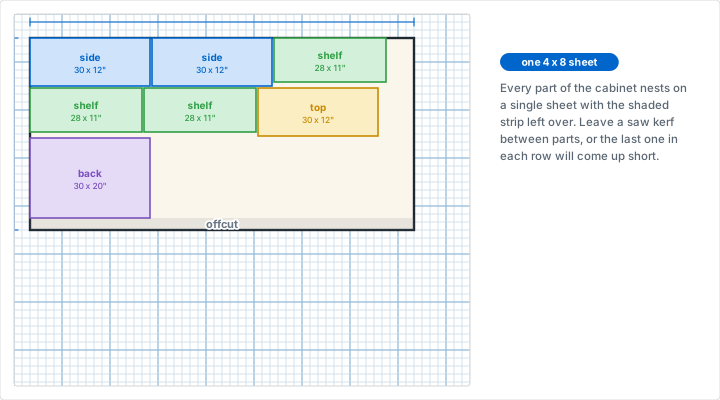
Sheet goods come in fixed sizes -- the standard is 4 feet by 8 feet -- and they are expensive. Planning how your parts nest onto each sheet before you cut can mean the difference between buying two sheets and buying three.
Graph paper is ideal for this. Draw a rectangle representing a full 4x8 sheet at a convenient scale (one square per inch is too large for a full sheet; try one square equals two or three inches, or one square per inch on coarser grid). Then lay out your plywood parts inside that rectangle like puzzle pieces, counting squares to size each one. Tips for efficient layouts:
- Account for the saw kerf: Every cut removes about an eighth of an inch of material. Leave a gap between parts on your layout so neighboring pieces do not end up undersized.
- Respect grain and face direction: On plywood with a directional veneer, orient all show-face parts the same way. A panel rotated ninety degrees to save space may look wrong in the finished piece.
- Plan full-length rip cuts first: It is far easier to break a full sheet down into long strips on a track saw or table saw, then cut those strips to length, than to chase small cuts across a heavy sheet.
- Group like widths: Parts that share a width can come from the same rip, which means fewer saw setups and more consistent results.
Number Parts on the Sheet Layout
Write each part's number directly inside its rectangle on the sheet layout. When you carry the plan to the saw, you can cut straight through the sheet in order and label each piece as it comes off, so nothing gets mixed up in a pile of look-alike plywood.
Joinery Detail Sketches
Overall plans show how a project goes together at the room scale. Joinery sketches show how two specific boards meet, and they are best drawn separately at a larger scale -- often one square per quarter inch or even per eighth inch -- so the detail is legible.
- Mortise and tenon: Draw the tenon's length, width, and thickness, and the matching mortise depth. A tenon roughly one-third the thickness of the stock is a common starting proportion.
- Dado and rabbet: Show the groove width and depth. A dado is usually cut to half the thickness of the board it houses, which you can lay out precisely by counting squares.
- Dovetails: Sketch the pin and tail spacing across the board width. Graph paper is perfect for stepping off even spacing and visualizing the angle before you mark the actual wood.
- Pocket holes and fasteners: Mark screw locations, dowel positions, and hardware so you can confirm nothing collides inside the joint.
These detail sketches also become your setup notes at the machine. The dado depth you worked out on paper is the depth you dial into the saw, no re-measuring required.
Isometric Views for 3D Visualization
Orthographic views are precise but flat. To see the whole piece in three dimensions on a single drawing, use an isometric view. In an isometric drawing, the three axes are drawn at 120 degrees to one another -- vertical lines stay vertical, and the two horizontal directions run at thirty degrees above horizontal. Crucially, measurements along all three axes use the same scale, so you can build the drawing by counting along the grid just like a flat plan.
Standard square graph paper works for isometric sketching if you are comfortable counting the thirty-degree angles, but dedicated isometric graph paper makes it far easier. Its grid of three line directions matches the isometric axes exactly, so every edge of your project follows a printed line. An isometric view is invaluable for catching problems that flat views hide -- a stretcher that collides with a drawer, an overhang that looks fine head-on but awkward in three dimensions -- and for showing a client or family member what you actually intend to build.
Combine Both View Types
Use orthographic views for dimensions and cutting, and an isometric view for visualization and assembly order. The flat views tell you how big each part is; the isometric view tells you how they stack together. Together they make a complete, buildable plan.
Common Mistakes
Mistake 1: Forgetting Nominal vs. Actual Lumber Sizes
Problem: Drawing a "2x4" as two inches by four inches. Dimensional lumber is sold at nominal sizes that are smaller than the actual board -- a 2x4 measures about 1.5 by 3.5 inches.
Fix: Draw and dimension every part at its actual finished size. Keep a reference of nominal-to-actual conversions taped to your bench, and never trust the name on the lumber.
Mistake 2: Ignoring the Saw Kerf
Problem: Laying out plywood parts edge to edge with no gap, then discovering the last part is an eighth of an inch short because every cut ate material.
Fix: Leave kerf space between parts in your sheet layout, and remember that cutting a board in half yields two pieces slightly less than half the original length.
Mistake 3: No Stated Scale
Problem: A drawing with no scale noted on it. Months later you cannot tell whether a square meant one inch or two, and the plan becomes a sketch you cannot build from.
Fix: Write the scale in the corner of every sheet before you draw a single line. Include the units and the date.
Mistake 4: Skipping Material Thickness
Problem: Treating boards as zero-thickness lines, so the inside dimensions of a case come out wrong once real three-quarter-inch stock takes up space.
Fix: Always draw and account for the thickness of every part. Calculate interior dimensions by subtracting the thickness of the surrounding panels from the overall size.
From Paper Plan to Workshop
A finished plan is more than a drawing -- it is a complete set of build instructions. Before you cut, give the plan a final review with these checks:
- Confirm the cut list totals. Add up parts by material and convert to board feet or full sheets so you buy the right amount in one trip.
- Verify every part has dimensions. Any part on the drawing without a number is a part you will guess at later. Fill the gaps now.
- Check fit and clearances. Will drawers open? Will doors clear? Will the finished piece fit through the doorway and up the stairs?
- Plan the assembly order. Note which joints get glued first. Some assemblies trap you if done out of sequence, leaving a clamp or a fastener unreachable.
- Make a clean copy for the shop. Print or redraw a final version. Tape it where you can see it, and keep the messy draft as a record of your decisions.
For projects that interact with a room -- built-in shelving, a kitchen island, a closet system -- it helps to plan the surrounding space on the same grid. Our room layout tutorial walks through scaling a floor plan so your furniture drawing and your space drawing speak the same language.
Conclusion
Graph paper turns a vague idea into a buildable plan with nothing more than a pencil and a ruler. Choose a scale, draw your orthographic views, dimension every part, build a cut list, lay out your sheet goods, and sketch the joints that matter. The grid keeps your proportions honest and your lines square, and the finished plan tells you exactly what to buy and how to build it. Start your next project on a fresh sheet, and you will spend less on wood, make fewer mistakes at the saw, and end up with a piece that fits the way you imagined.
Ready to Draw Your Next Build?
Generate custom graph paper for your woodworking plans. Choose your grid spacing, paper size, and line weight, then print as many copies as you need.
Generate Custom Graph PaperRelated Resources
- How to Choose the Right Grid Size
- Engineering Graph Paper -- ideal for dimensioned orthographic plans
- Sketching Circuits on Graph Paper -- drilling an enclosure to a counted grid
- Isometric Graph Paper -- for 3D project visualization
- Isometric Drawing on Graph Paper -- exploded assembly views for showing build order
- Professional Printing Tips
- Room Layout Tutorial -- plan furniture in its space
- Graph Paper Use Cases Across Industries
- Designing Board Games on Graph Paper
- Gingerbread House Templates on Graph Paper: the same cut list and cutting diagram at biscuit scale